Ich habe 2 Actalis Email Zertifikate erstellt zum Test von S/MIME.
In grommunio web habe ich das info@abc.p12 Zertifikat für die Email info@abc.de importiert und eine signierte Email an info@def.de (Outlook Client) gesendet. Dort kommt die Email an und der Kontakt wird hinzugefügt.
Nun kann eine signierte und verschlüsselte Email von Outlook info@def.de nach grommunio web info@abc.de gesendet werden. In grommunio web wird "Die digitale Signatur hat die Prüfung bestanden." angezeigt
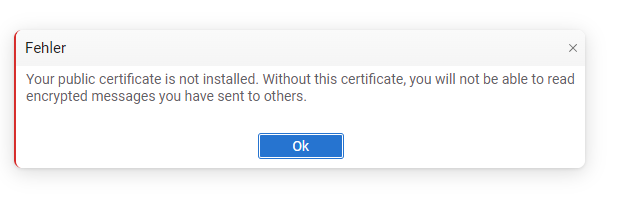
Wenn man nun allerdings eine signierte und verschlüsselte Nachricht von grommunio web an Outlook senden möchte kommt ein Fehler "Your public certificate is not installed. Without this certificate, you will not be able to read encrypted messages you have sent to others."
Wieso bekommt grommunio nicht das public Zertifikat von der Outlook Email info@def.de?
Oder wo kann man das hochladen oder speichern?
Sollte grommunio das nicht automatisch machen von empfangenen signierten Emails?
Oder benötigt man hierfür ein Browser Plugin wie z. Bsp. Mailvelope?
Außerdem erscheinen mit der Zeit hier mehrere Einträge:
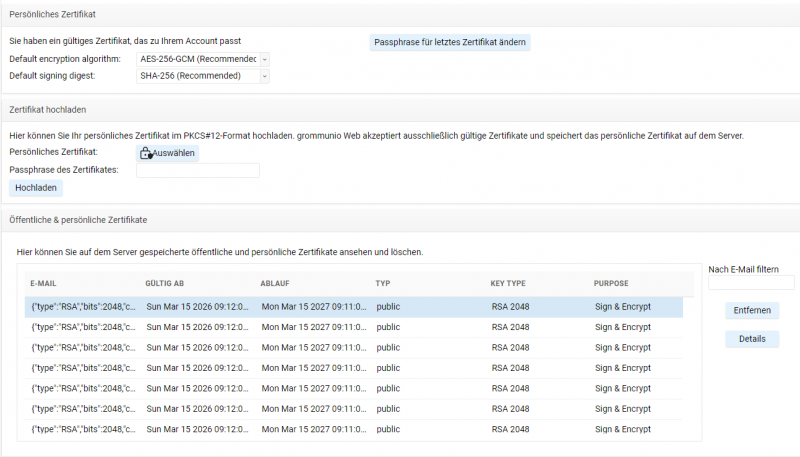
Beim Zertifikatname wird außerdem ein json String davor gesetzt:
Zertifikatdetails:
E-Mail: {"type":"RSA","bits":2048,"curve":null,"purpose":"both"}info@def.de
Serial: 123123123123123
....
{"type":"RSA","bits":2048,"curve":null,"purpose":"both"} <- Sollte das json in php nicht abgeschnitten werden?
Ich habe die Funktion angepasst, damit geht die Fehlermeldung weg aber die Verschlüsselung funktioniert noch nicht:
Es sieht so aus als ob der Zertifikatname ein prefix vor dem Email Namen hat {"type":"RSA","bits":2048,"curve":null,"purpose":"both"}
plugin.smime.php
public function pubcertExists($emailAddress, $gabUser = false) {
if ($gabUser) {
$user = $this->getGABUser($emailAddress);
$gabCert = $this->getGABCert($user);
if ($user && !empty($gabCert)) {
return true;
}
}
$root = mapi_msgstore_openentry($this->getStore());
$table = mapi_folder_getcontentstable($root, MAPI_ASSOCIATED);
// JSON-Teil dynamisch hinzufügen
$jsonPrefix = '{"type":"RSA","bits":2048,"curve":null,"purpose":"both"}';
$emailWithJson = $jsonPrefix . $emailAddress;
// Restriction für Public Certificates
$restrict = [RES_AND, [
[RES_PROPERTY,
[
RELOP => RELOP_EQ,
ULPROPTAG => PR_MESSAGE_CLASS,
VALUE => [PR_MESSAGE_CLASS => "WebApp.Security.Public"],
],
],
[RES_CONTENT,
[
FUZZYLEVEL => FL_FULLSTRING | FL_IGNORECASE, // exaktes Matching mit JSON
ULPROPTAG => PR_SUBJECT,
VALUE => [PR_SUBJECT => $emailWithJson],
],
],
]];
mapi_table_restrict($table, $restrict, TBL_BATCH);
mapi_table_sort($table, [PR_MESSAGE_DELIVERY_TIME => TABLE_SORT_DESCEND], TBL_BATCH);
$rows = mapi_table_queryallrows(
$table,
[PR_SUBJECT, PR_ENTRYID, PR_MESSAGE_DELIVERY_TIME, PR_CLIENT_SUBMIT_TIME],
$restrict
);
// Debug
error_log("DEBUG pubcertExists: email=$emailAddress, emailWithJson=$emailWithJson, rows found=" . count($rows));
return !empty($rows);
}
Wenn ich diese Zeile auskommentiere // PR_SUBJECT_PREFIX wird schon einiges besser:
mapi_setprops($assocMessage, [
PR_SUBJECT => $certEmail,
PR_MESSAGE_CLASS => $type === 'public' ? 'WebApp.Security.Public' : 'WebApp.Security.Private',
PR_MESSAGE_DELIVERY_TIME => $certData['validTo_time_t'],
PR_CLIENT_SUBMIT_TIME => $certData['validFrom_time_t'],
PR_SENDER_NAME => $certData['serialNumber'], // serial
PR_SENDER_EMAIL_ADDRESS => $issued_by, // Issuer To
// PR_SUBJECT_PREFIX => $keyTypeJson, // Key type metadata (JSON)
PR_RECEIVED_BY_NAME => $this->fingerprint_cert($cert, 'sha1'), // SHA-1 Fingerprint
PR_INTERNET_MESSAGE_ID => $this->fingerprint_cert($cert, 'sha256'), // SHA-256 Fingerprint (primary)
]);
Allerdings kommt dann in Outlook eine Meldung beim öffnen der verschlüsselten Email:
Diese Element kann nicht geöffnet werden. Der Name Ihrer digitalen ID kann im zugrunde liegenden Sicherheitssystem nicht gefunden werden.
Im MIME Menü wird außerdem nun nur die Email angezeigt ohne den $keyTypeJson Prefix.
