Hi there,
I was looking forward to easily import the OVA-Image again after your E-Mail that the TLSv1.2-Protocol was again allowed at download.grommunio.com.
Sadly.. it doesn't work. I even checked a second VCenter to be sure it's not my Host.
Manual Works
$vcenter = Connect-VIServer -Server 10.10.10.24 -User Administrator@vsphere.local -Password "XXXXXXXXX"
$vmsource="\\nas-01\iso\grommunio_Appliance.x86_64-2021.08.2-Build7.8.ova"
$vmhost=Get-VMHost
$datastore=Get-Datastore -Name cb
$vmname="GromiTest"
$vmhost |Import-VApp -Source $vmsource -Datastore $datastore -Name $vmname
...
PS /home/cb> Get-VM -Name 'GromiTest'
Name PowerState Num CPUs MemoryGB
---- ---------- -------- --------
GromiTest PoweredOff 4 6.000
PS /home/cb> Get-VM -Name 'GromiTest' |FL *
WARNING: The 'Version' property of VirtualMachine type is deprecated. Use the 'HardwareVersion' property instead.
Name : GromiTest
PowerState : PoweredOff
Notes :
Guest : GromiTest:SUSE Linux Enterprise 15 (64-bit)
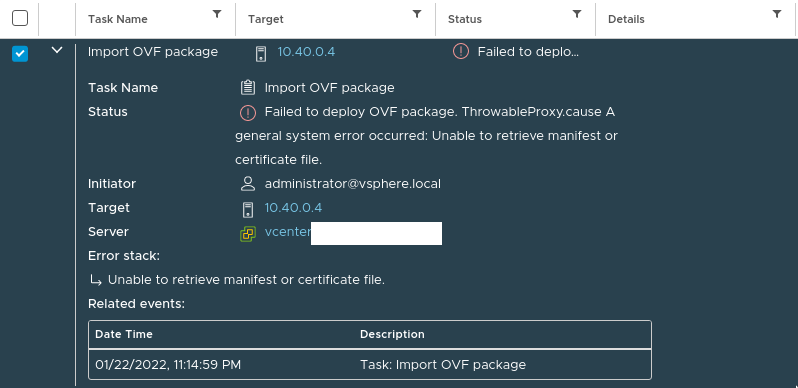
And via Gui it Breaks (Direct Download)
"Task Name","Target","Status","Details","Initiator","Queued For","Start Time","Completion Time","Execution Time","Server"
"Import OVF package","10.40.0.4","Failed to deploy OVF package.
ThrowableProxy.cause
A general system error occurred:
Unable to retrieve manifest or certificate file.","","administrator@vsphere.local","143 ms","01/22/2022, 11:14:59 PM","01/22/2022, 11:16:51 PM","1 m 51 s","dasdasasddsadsaadsdsadsa
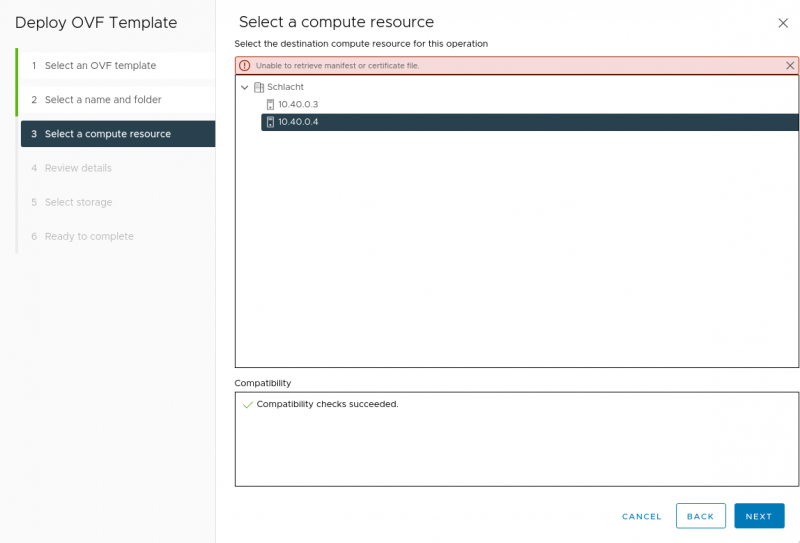
As it seems it works as a direct Download with ovftool as explained here but i haven't tried that yet if the error persists even with with this solution or if it would be a even better solution :-).
